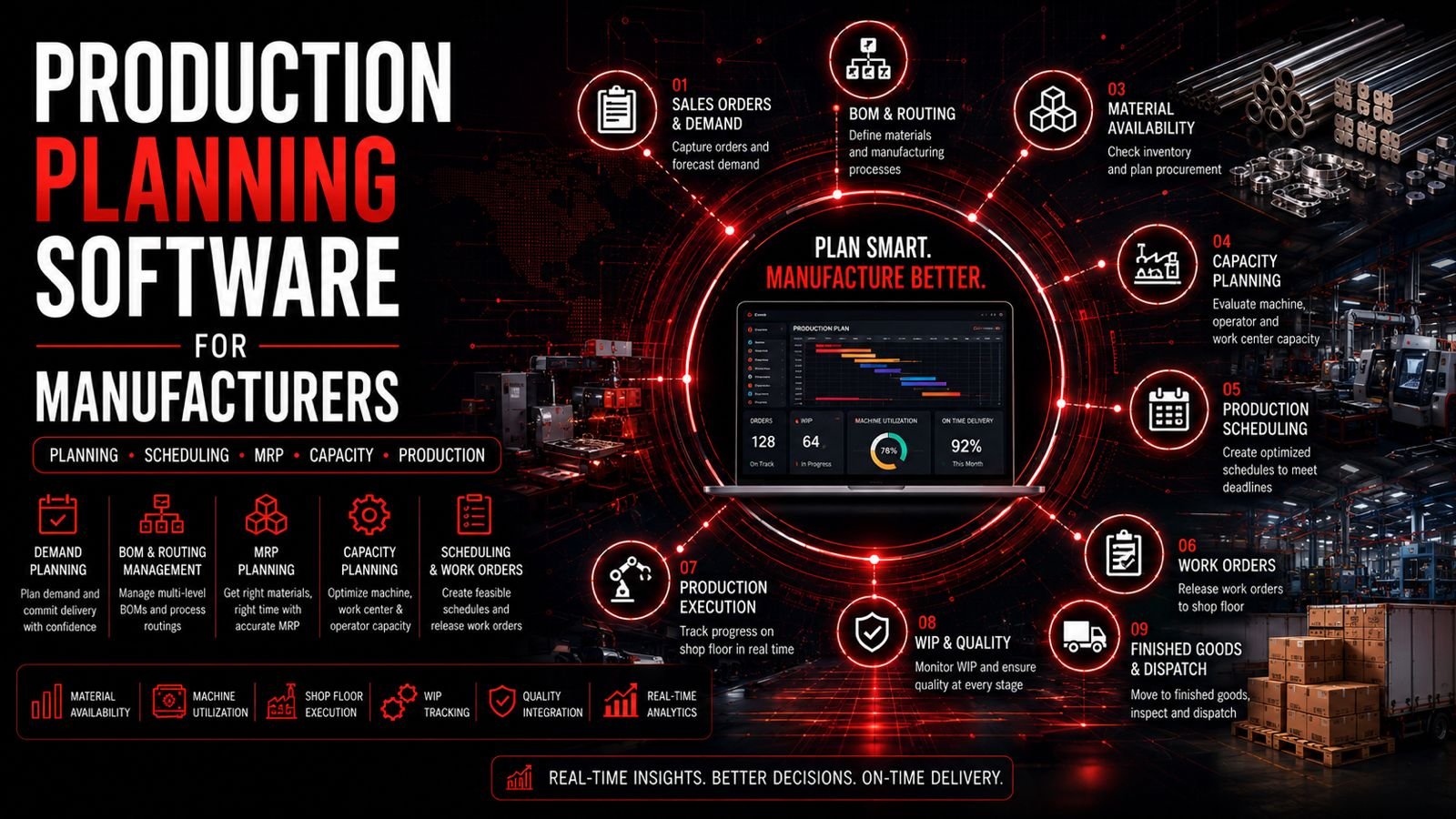
Production planning software for manufacturers is a system that helps plan production orders, materials, machines, manpower, work orders and schedules. It connects customer orders with BOM, routing, material availability, machine capacity, work orders, shop-floor execution, WIP tracking, quality and dispatch, providing visibility into production status and delivery commitments.
- Production planning software connects customer orders with materials, machines, work orders and schedules
- BOM and routing form the foundation for production planning and scheduling
- MRP helps ensure material availability for planned production
- Capacity planning helps balance workload across machines and work centers
- Work orders and job cards provide detailed production instructions
- Shop-floor tracking provides visibility into WIP and production status
- Integration with inventory and purchasing improves material availability
- Production analytics helps identify bottlenecks and improvement areas
- AI-assisted scheduling can help optimize production plans
- Choosing the right system depends on production complexity and business requirements
- Production Planning Workflow
- What Is Production Planning Software?
- Why Manufacturers Need Production Planning
- Core Features
- Material Requirement Planning
- Capacity Planning
- Production Scheduling
- Work Order Management
- Shop Floor Management
- Material & Inventory Integration
- WIP Management
- Machine Downtime Management
- Quality Integration
- Job Work & Subcontracting
- Production Costing
- Production Planning for Industries
- Production Planning vs Excel
- Production Planning vs MRP
- AI in Production Planning
- Production Analytics
- Mobile Production Planning
- Integrations
- Security
- Implementation Process
- Cost
- When to Use Production Planning Software
- Buyer's Guide & Checklist
- Common Production Planning Mistakes
- Production Planning Software in Bangalore
- FAQs
- Conclusion
- Get Started
Production Planning Workflow
This workflow represents the production planning cycle in a manufacturing company. Production planning software connects each stage, providing visibility into order status, material availability, machine capacity, work order progress and delivery commitments.
What Is Production Planning Software?
Production planning software for manufacturers is a system designed to plan and coordinate production activities. It helps manufacturers translate customer orders into production plans, determine material requirements, check machine capacity, create work orders, schedule production and track WIP through to completion.
The system typically includes features for demand planning, BOM management, routing, material requirement planning, capacity planning, work order management, production scheduling, shop-floor tracking, WIP management and production analytics.
Why Manufacturers Need Production Planning Software
Manufacturers often face production planning challenges:
- Excel-based production planning: Spreadsheets become difficult to maintain as production grows
- Manual scheduling: Planners spend significant time creating and updating schedules
- Machine conflicts: Multiple jobs competing for the same machines
- Material shortages: Materials are not available when needed
- Unplanned downtime: Machine breakdowns disrupt schedules
- Poor WIP visibility: Managers lack visibility into production progress
- Delayed orders: Delivery dates are frequently missed
- Overloaded work centers: Some machines are overutilized while others are idle
- Underutilized machines: Capacity is not fully utilized
- Poor production coordination: Departments are not aligned
Production planning software addresses these challenges by centralizing planning data, automating scheduling, providing real-time visibility and enabling better coordination across departments.
Core Features of Production Planning Software
1. Demand Planning
Manage customer orders, forecast demand, production requirements, delivery dates and priority orders. Demand planning forms the basis for production planning.
2. BOM Management
Manage Bill of Materials with components, raw materials, quantities and multi-level BOM structures. BOM revisions help maintain version control.
3. Routing Management
Define operation sequences, work centers, machines, setup time, cycle time, inspection stages and outsourced processes. Routing determines how products are manufactured.
4. Material Requirement Planning (MRP)
Calculate material requirements based on demand, BOM, current inventory and open purchases. MRP identifies material shortages and suggests procurement.
5. Capacity Planning
Check machine capacity, work-center capacity, available hours, planned hours, setup time, cycle time and utilization. Capacity planning helps balance workload.
6. Production Scheduling
Create daily, weekly and monthly production schedules. Schedule jobs by machine, work center and priority. Identify scheduling conflicts.
7. Work Order Management
Create work orders and job cards with part number, quantity, machine, operator, process, planned start/completion and production status.
8. Shop Floor Management
Track job status, machine status, operator allocation, production quantity, rejection, rework, downtime and WIP.
Material Requirement Planning (MRP)
MRP is a critical component of production planning:
Demand → BOM → Current Inventory → Open Purchases → Material Requirement
MRP helps manufacturers:
- Determine what materials are required and when
- Identify material shortages
- Plan purchases and procurement
- Consider lead times and safety stock
Machine & Production Capacity Planning
Capacity planning helps manufacturers:
- Check machine capacity and work-center capacity
- Track available hours, planned hours and utilization
- Account for setup time, cycle time and downtime
- Plan maintenance and identify capacity constraints
The difference between theoretical capacity and available production capacity is important for realistic planning.
Production Scheduling Software
Production scheduling involves:
- Creating daily, weekly and monthly production schedules
- Machine-wise and work-center scheduling
- Priority-based scheduling based on delivery dates
- Handling schedule changes and re-scheduling
- Identifying scheduling conflicts and bottlenecks
Software helps planners create and maintain schedules more efficiently than manual methods.
Work Order Management
Work orders provide detailed production instructions:
- Work order creation with part number and quantity
- Machine and operator allocation
- Process and operation sequence
- Planned start and completion dates
- Actual completion and production status
Shop Floor Production Tracking
- Job status and progress tracking
- Machine status and operator allocation
- Production quantity and rejection tracking
- Rework and downtime tracking
- WIP visibility
Material & Inventory Integration
Production planning integrates with inventory management:
Production Plan → Material Requirement → Inventory Check → Purchase → Material Issue → Production
- Check raw materials, components and consumables availability
- Identify material shortages
- Trigger purchase requisitions
- Track material issue to production
Work-in-Progress Tracking
- Jobs in production
- Current operation and completed operations
- Pending operations and remaining quantity
- Quantity produced, rejected and reworked
Managing Machine Downtime in Production Planning
- Breakdown and preventive maintenance
- Unavailable machines and schedule changes
- Alternate machines and production delays
Software helps planners react to downtime but does not eliminate it.
Quality Integration
- Incoming, in-process and final inspection
- Rejection and rework tracking
- Non-conformance management
Quality status affects production completion and delivery schedules.
Production Planning for Outsourced Processes
Examples: Heat treatment, plating, coating, grinding, anodizing, special inspection. Software helps incorporate outsourced operations into production workflows.
Production Costing & Variance Analysis
Production Cost = Material + Labour + Machine Time + Setup + Outsourcing + Overheads
- Estimated cost and actual cost tracking
- Cost variance analysis
- Job and product profitability
Production Planning for Different Industries
CNC Manufacturing
Machine scheduling
Precision Engineering
BOM, routing
Auto Components
Production planning
Aerospace
Complex BOM
Electronics
Assembly planning
Electrical
Production scheduling
Production Planning vs Excel
| Area | Excel | Production Planning Software |
|---|---|---|
| Production Schedule | Manual | ✓ Automated |
| Machine Capacity | Difficult | ✓ Yes |
| Material Availability | Manual check | ✓ Integrated |
| Work Orders | Manual | ✓ Yes |
| Priority Changes | Manual update | ✓ Easy |
| Production Visibility | Limited | ✓ Real-time |
| Reporting | Manual | ✓ Automated |
Production Planning vs MRP
- Production Planning: Decides what, when and how much to produce
- MRP: Determines what materials are required and when
Both work together in an integrated system.
AI in Production Planning
- Demand forecasting based on historical data
- Production schedule recommendations
- Capacity optimization suggestions
- Material requirement predictions
- Delay risk identification
- Bottleneck detection
- Production anomaly detection
- AI-generated production summaries
AI should support planners rather than blindly replace operational decisions.
Production Analytics
- Planned vs actual production
- Machine utilization and efficiency
- Schedule adherence
- WIP, rejection and rework trends
- Downtime and production delays
- Order completion rates
Mobile Production Management
- Monitor production status and work orders
- Check machine status and material availability
- Approve workflows and production changes
- Access production reports and dashboards
Production Planning Integrations
- ERP for business management
- Inventory for material visibility
- Purchase for procurement
- CRM for customer orders
- Accounting for costing
- HR for workforce planning
- Maintenance for downtime planning
- Quality for inspection integration
- MES for shop-floor integration
- Barcode systems for tracking
- APIs for custom integrations
- BI/analytics for reporting
Production Planning Security
- Authentication and role-based access
- Planner and production-user permissions
- Audit logs for planning changes
- Data encryption and backups
- API security and monitoring
Implementation Process
- Map production processes and workflows
- Define products and BOMs
- Configure routings and operation sequences
- Define machines and work centers
- Set up capacity and working hours
- Configure inventory integration
- Configure production workflows
- Migrate master data (products, BOMs, routing)
- Test production scenarios and scheduling
- Train planners and supervisors
- Go live and monitor
- Optimize processes
How Much Does Production Planning Software Cost?
Cost depends on:
- Number of users and planners
- Production complexity and BOM levels
- Number of machines and work centers
- MRP and capacity planning requirements
- Inventory and ERP integration
- Mobile application
- Customization
- Data migration
- Hosting (cloud vs on-premise)
- Training and support
Categories: Basic Production Planning → Manufacturing Planning Platform → Integrated MRP → Custom Manufacturing ERP
When Should a Manufacturer Use Production Planning Software?
- Production orders are increasing in volume and complexity
- Schedules are managed in Excel and becoming difficult
- Machines frequently conflict and schedules clash
- Material shortages delay production
- Managers lack WIP and production progress visibility
- Delivery dates are frequently missed
- Production priorities change often
- Multiple work centers and machines are involved
- Subcontracting is increasing and needs coordination
- Manual planning consumes significant management time
Buyer's Guide: How to Choose Production Planning Software
- Production workflows: Does it understand manufacturing processes?
- BOM: Multi-level BOM support
- Routing: Operation sequencing and work centers
- MRP: Material requirement planning
- Capacity planning: Machine and work-center capacity
- Machine scheduling: Schedule creation and optimization
- Work orders: Creation and management
- WIP: Work-in-progress tracking
- Inventory integration: Material availability
- Quality integration: Inspection and rejection
- Maintenance integration: Downtime planning
- Job work: Subcontracting management
- Production costing: Cost estimation and variance
- Reporting: Analytics and dashboards
- Mobile access: Remote monitoring
- APIs: Integration capabilities
- Security: Access control and audit
- Scalability: Growth potential
- Data migration: Support for existing data
- Support: Training and ongoing assistance
50-Point Production Planning Checklist
Common Production Planning Mistakes
- Planning without accurate inventory data
- Ignoring machine capacity and setup times
- Poor BOM and routing data
- No production priorities or scheduling rules
- Ignoring maintenance downtime
- No WIP visibility and progress tracking
- Manual schedule changes without system updates
- Not integrating purchasing with production planning
- Not involving shop-floor teams in planning
- Choosing software only on price
Production Planning Software for Manufacturers in Bangalore
Bangalore's Production Planning Needs
Manufacturing companies across Peenya, Yeshwanthpur, Rajajinagar, Nelamangala, Bommasandra, Jigani, Hosur Road, Electronic City, Whitefield and Devanahalli need production planning software to coordinate materials, machines, work orders and schedules. Whether you are a CNC job shop, precision engineering company, auto component manufacturer or general engineering firm, structured production planning improves on-time delivery and operational efficiency.
Frequently Asked Questions
Explore More Solutions
Conclusion: Bring Your Production Planning Under Control
Manufacturers need more than spreadsheets for production planning. Production planning software connects customer orders, BOM, routing, material requirements, machine capacity, work orders, scheduling, shop-floor execution, WIP, quality and dispatch into a unified system. Whether you are a CNC shop, precision engineering company, auto component manufacturer or general engineering firm, structured production planning helps improve on-time delivery and operational efficiency.
By implementing production planning software, manufacturers can coordinate materials, machines and work orders, reduce scheduling conflicts, improve WIP visibility and make data-driven decisions. The key is to choose a solution that understands manufacturing production workflows and can integrate with inventory, purchasing and quality management.
Ready to Bring Your Production Planning Under Control?
If your manufacturing business is ready to replace spreadsheets with structured production planning software, request a consultation to discuss your production workflows, BOM, MRP, capacity planning and scheduling requirements.